
Consulting-grade decks, iterations in minutes, in your template.
Riplo runs the numbers, then builds the slide. Give it a model, a data room extract or your notes, and the sizing, bridges and cohort charts come back as exhibits with every figure traced to your file.
- Works in Riplo, Claude and ChatGPT.
- Your template on every slide.
- Charts stay editable in PowerPoint.










Pick a deck type and see the exhibits.
Riplo picks the comparison before it picks the chart. The title states the conclusion and its number, and the source sits beside the figure.
Every title states the decision and its number.
A slide headed “Revenue growth” tells a board nothing. Riplo writes the conclusion into the title, then checks it against the exhibit.
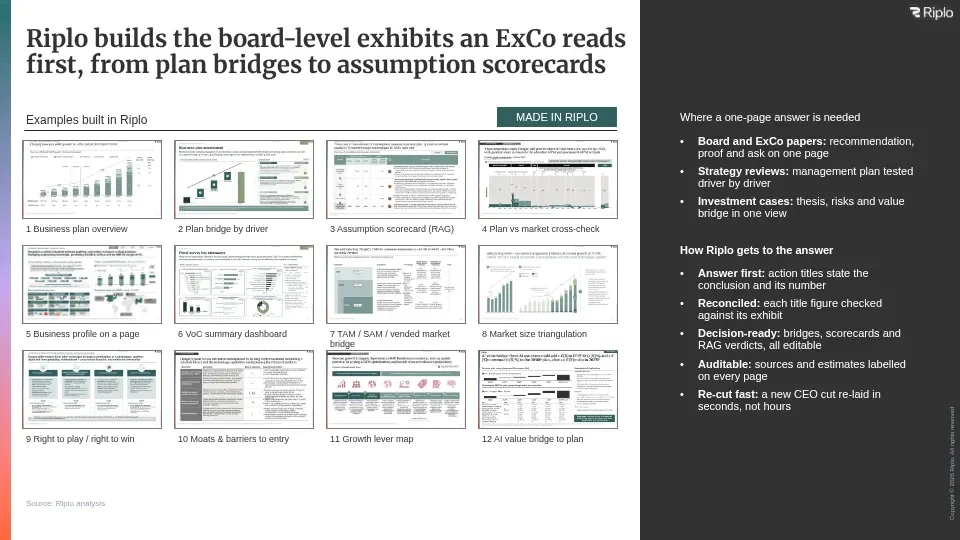
Made for the decks consultants actually build.
Charts a consultant would build.
Bridges, cohort charts, Mekkos and bottom-up sizing builds arrive laid out, labelled and sourced.
Figures you can defend.
Every number comes from a file you supplied, and each one is checked back against it before export.
Your template, every slide.
Your colours, fonts and chart conventions are applied as each slide is built, so nothing is off-brand.
You approve everything.
Nothing is shared or exported without you, and every AI edit sits in a history you can roll back.
Build decks straight from Claude or ChatGPT.
Connect Riplo Slides once, then ask for a deck in the assistant you already have open. Same template rules, same editable charts, no canvas to learn.
See the Claude skills packFree Claude skill.
Eighteen rules, no sign-up.
- 01Shape the story
- 02Build the evidence
- 03Review the deck
We use it on our own client work.
Riplo is an AI advisory firm. The exhibits this tool builds are the ones our consultants put in front of investment committees, so the defaults are a consultant’s own.
And so do teams at other firms.
Riplo made me a full deck i took to a client in 5 mins
I was particularly impressed by how intuitive the platform is, the quality of the slides it produces, and how smoothly the AI responds to feedback and corrections.
Version history for each single slide - simple but super effective
Client data stays in the UK.
The questions your IT and compliance teams ask first.
SOC 2 Type 2
Independently audited for security.
Hosted in London
Decks, files and exports stay in the UK.
No US model API
Models run in eu-west-2 and stay there.
Your permissions apply
An assistant sees only what you can see.
No model training
No training, by Riplo or the provider.
Does it work in our firm’s own template?
Riplo Slides supports templates and themes for slide creation, so your team starts from its own standard rather than a generic deck. Slides you create and edit keep that structure.
Can I export a deck?
Riplo Slides exports to PowerPoint and to PDF. A PowerPoint export carries its charts across as native charts, so they stay editable in PowerPoint; a PDF is a flat document for sending and reading. Available exports depend on your access to the deck.
Does it help with the content, or only the formatting?
Both. AI helps with the first pass at the story and the content on each slide, not just the layout. You bring the context, check the evidence, and decide what the deck argues.
Where can I find security information?
The Security page explains workspace access and connector permissions. For audit documents and the scope of Riplo’s controls, use the Riplo trust centre.